
Earnings
what earns, and for whom.
Token Forge adds no fee of its own to anything. The revenue mechanism that exists in the code is the Token-2022 transfer fee, which earns the operator of a Reward token from transfers of that token. Other presets record entitlements you sell through your usual channels.
01The short version
| Mechanism | Who receives it | Status in the code |
|---|---|---|
| Transfer fee on a Reward token | You, as the token's operator: a share of every transfer of your token | Built. Console builds harvest and withdraw. |
| Selling the entitlement (membership, licence, credits, pass) | You, through your own checkout | Outside the forge. The token records the entitlement; the forge issues and revokes it. |
| A creation fee or vendor fee | Nobody | Not present. There is no fee field, fee wallet or revenue section in Settings. |
The reasoning is in DOCS/EARNING.md in the package. In short: whoever signs the mint transaction is the token's owner, so a creation fee would only move your own SOL to yourself.
02Set up a transfer fee
- Step 1: pick Reward tokenIt is the only preset that is both transferable and fee-bearing. It uses 6 decimals, so a percentage fee has room to round.
- Step 3: set the feeFee, basis points (100 = 1%, up to 10,000) and Maximum per transfer in base units. The preset starts at 1% with a cap of 1,000 tokens. The tile shows what is sent, withheld and arrives.
- Step 4: keep two authoritiesTransfer fee config authority (to change the rate or cap later) and Withdraw withheld authority (to collect). The forge will not build a fee-bearing mint without a withdraw authority.
- Step 5: read the consequencesA fee means the amount that arrives is smaller than the amount sent. That breaks anything expecting an exact amount and affects listing at venues.
- Collect regularlyIn Console → Fees: build a harvest, then a withdrawal. Nothing is collected automatically.
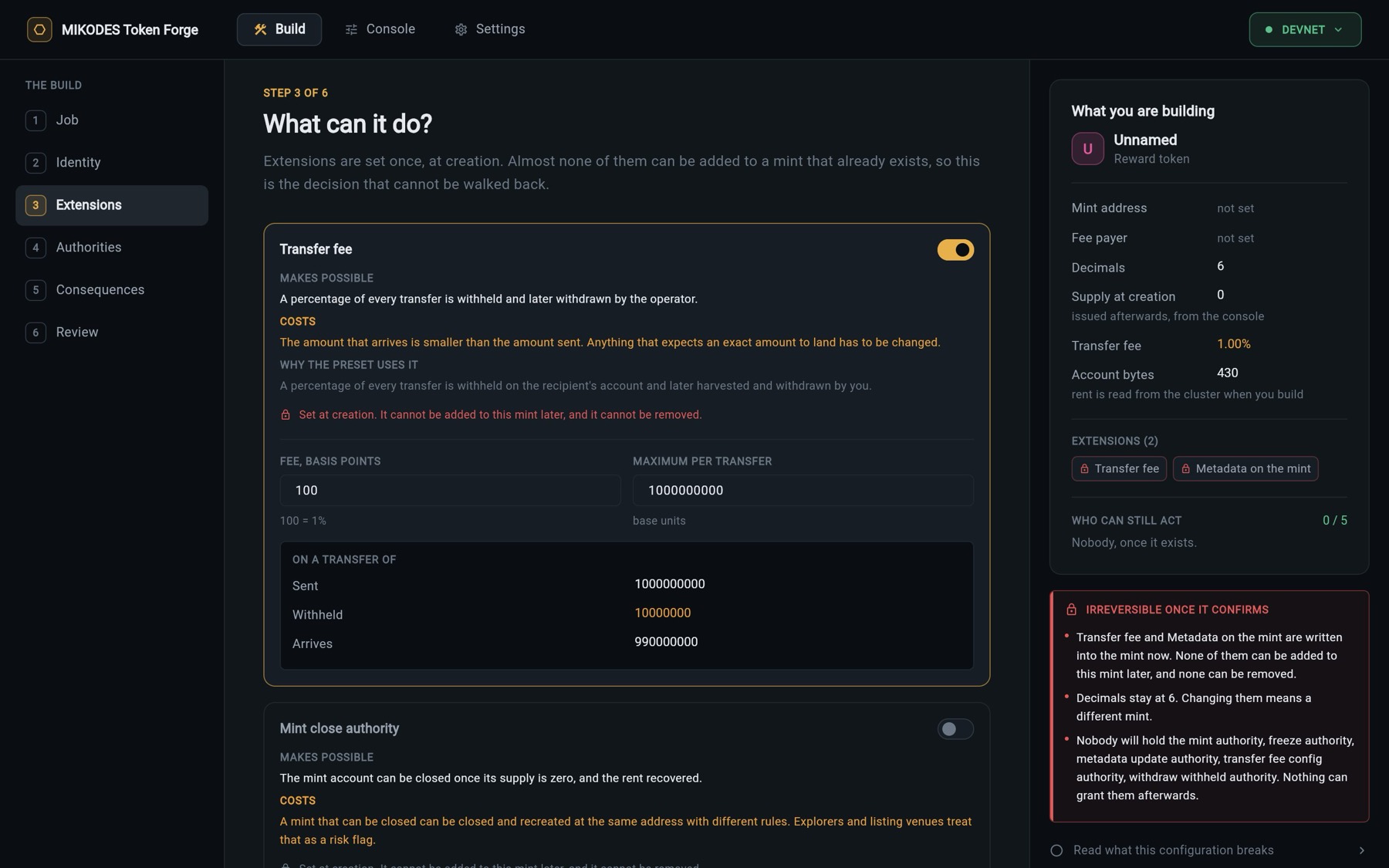
The extension itself cannot be added to or removed from a mint later. The rate and cap can be changed while you hold the fee config authority; Token-2022 applies a new rate after two epochs.
03What was measured on devnet
Example, from DOCS/proofs/operations.json (run of tool/devnet/prove_operations.dart against the same Token-2022 program devnet runs). These are test transfers, not a forecast of income:
| Step | Result on chain |
|---|---|
| Sent 100.000000 at 2.5% | 97.500000 arrived |
| Sent 500.000000, 2.5% would be 12.5, cap 5 | Fee of 5.000000 (the cap) |
| Harvested to the mint | 7.500000 |
| Withdrawn to the operator | 7.500000, 0 left |
What a fee brings in depends entirely on how much your token is actually transferred. The forge shows only figures already read from the chain; it makes no projections.
04The other six presets
Membership, Licence, Loyalty points and Pass / ticket are non-transferable; API credits and Whitelist token carry no fee. There is no transfer to take a share of. The money in those models is the membership fee, the licence fee or the prepaid credit, collected wherever you already collect payments. The forge is not a payment rail.
Tokens you create, and any fee they carry, may have legal, tax and consumer-protection consequences where you operate. Take advice before a mainnet launch.
05If you want a creation fee anyway
You have the source. If a third party funds the mint in your model (an agency creating tokens for clients), a creation fee can make sense. Keep two rules from DOCS/EARNING.md: the transfer must be a real instruction emitted by MintBuilder.build (lib/core/token2022/mint_builder.dart) so it appears in the review list, and it must be off and zero by default. Run flutter test afterwards; test/presets_and_builder_test.dart checks instruction counts and transaction size.